Create an API key and call the ERPNext REST API
Applies to: Frappe v15, v16. ERPNext v15, v16. Self-hosted bench. Checked 2026-11 on Frappe v16.54.0 and ERPNext v16.53.0. We did not test v15.
To call the ERPNext REST API from a script, give a user an API key and secret. Then send this header with every request:
Authorization: token <api_key>:<api_secret>
The request runs as that user, with that user's roles. You do not need to log in first, and you do not need a CSRF token.
Step 1: Make an API user#
Do not use Administrator for an integration. Make a separate user with only the roles the integration needs.
- Open the User list and click Add User.
- Enter an email, for example
api-bot@example.com, and a first name. Save. - Open the Roles & Permissions tab.
- Tick only the roles the integration needs. We used
Sales User. Save.
The user must be a System User. A role with Desk Access makes it one.
Step 2: Generate the key and secret#
- Open the user as a System Manager.
- Open the Settings tab, then expand API Access.
- Click Generate Keys.
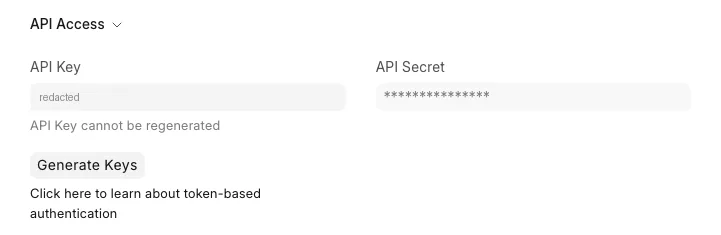
A dialog shows the API Key and the API Secret. Copy the secret now. After you close the dialog, the form shows it only as ***.
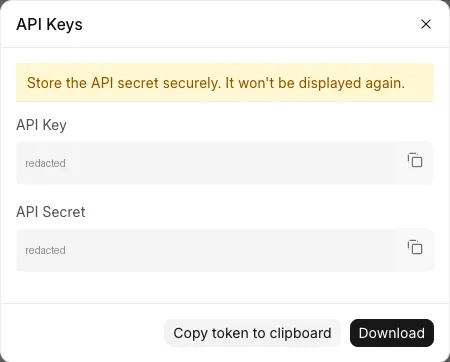
If you click Generate Keys again, Frappe keeps the key and makes a new secret. The old secret stops working at once. So do this only when you want to rotate the secret.
Step 3: Test the key#
Run this from any machine that can reach your site:
curl -H "Authorization: token <api_key>:<api_secret>" \
  https://<your-site>/api/method/frappe.auth.get_logged_user
Replace <your-site>, <api_key> and <api_secret> with your values. We got:
{"message":"api-bot@example.com"}
Read a list: GET with fields and filters#
/api/resource/<DocType> returns a list. By default, it returns only name and 20 rows. Use fields, filters and limit_page_length to change this. Pass them as JSON.
curl -G -H "Authorization: token <api_key>:<api_secret>" \
  "https://<your-site>/api/resource/Customer" \
  --data-urlencode 'fields=["name","customer_group","territory"]' \
  --data-urlencode 'filters=[["customer_name","like","%Foods%"]]' \
  --data-urlencode 'limit_page_length=20'
{"data":[{"name":"Asha Foods","customer_group":"Government","territory":"Rest Of The World"}]}
Each filter is [fieldname, operator, value]. Operators include =, !=, >, <, like, in and between. Use order_by=creation desc to sort. Use limit_start to get the next page.
To read one document, add its name to the URL:
curl -H "Authorization: token <api_key>:<api_secret>" \
  "https://<your-site>/api/resource/Item/TEA-500"
DocType names with a space need %20 in the URL, for example Sales%20Order. With a plain space, curl stops with exit code 3 and prints nothing.
Create a document: POST#
Send the fields as a JSON body. Child tables, such as items, are lists of rows.
curl -X POST -H "Authorization: token <api_key>:<api_secret>" \
  -H "Content-Type: application/json" \
  "https://<your-site>/api/resource/Sales%20Order" \
  -d '{"customer":"Asha Foods","delivery_date":"2026-11-15","items":[{"item_code":"TEA-500","qty":4,"rate":250}]}'
The response has the new document in data. Ours was SAL-ORD-2026-00001, a Draft with a grand total of 1000.
Update a document: PUT#
Send only the fields you want to change:
curl -X PUT -H "Authorization: token <api_key>:<api_secret>" \
  -H "Content-Type: application/json" \
  "https://<your-site>/api/resource/Sales%20Order/SAL-ORD-2026-00001" \
  -d '{"po_no":"PO-7781"}'
If you send a child table, such as items, the rows you send replace all existing rows.
To submit a document, send {"docstatus": 1} in a PUT. We submitted our Sales Order this way, and its status became "To Deliver and Bill". You can also send "docstatus": 1 in the POST to create and submit in one call.
The same calls in Python#
We ran this with Python requests 2.32.5:
import json

import requests

SITE = "https://<your-site>"
API_KEY = "<api_key>"
API_SECRET = "<api_secret>"

session = requests.Session()
session.headers["Authorization"] = f"token {API_KEY}:{API_SECRET}"

response = session.get(
    f"{SITE}/api/resource/Sales Order",
    params={
        "fields": json.dumps(["name", "customer", "grand_total", "status"]),
        "filters": json.dumps([["customer", "=", "Asha Foods"]]),
        "order_by": "creation desc",
        "limit_page_length": 50,
    },
)
response.raise_for_status()
print(response.json()["data"])

response = session.post(
    f"{SITE}/api/resource/Customer",
    json={"customer_name": "Ravi Stores", "customer_type": "Company"},
)
response.raise_for_status()
print(response.json()["data"]["name"])
It printed our Sales Order list and then Ravi Stores. requests encodes the space in Sales Order for you. Keep the key and secret in an environment variable or a secrets file, not in the code.
API v2#
Frappe v15 and v16 also have /api/v2. The same token header works. We tested these on v16:
| v1 | v2 |
|---|---|
GET /api/resource/Customer |
GET /api/v2/document/Customer |
GET /api/resource/Sales Order/<name> |
GET /api/v2/document/Sales Order/<name> |
PUT /api/resource/... |
PATCH or PUT /api/v2/document/... |
/api/method/<dotted.path> |
/api/v2/method/<dotted.path> |
| none | GET /api/v2/doctype/Sales Order/count |
The v2 responses use data for every result, including method calls. A v2 list also returns has_next_page. v2 errors come in an errors list:
{"errors":[{"type":"AuthenticationError"}]}
Errors and what they mean#
| Response | Cause |
|---|---|
401 with "exc_type":"AuthenticationError" |
The key or secret is wrong, or the secret was regenerated. |
403 with Insufficient Permission for Customer and no token sent |
The header is missing. Frappe treats the call as Guest. |
403 with Insufficient Permission for Supplier |
The user has no role that can read that DocType. Add a role, or use a different user. |
403 with Function frappe.utils.data.now is not whitelisted. |
You called a Python function that is not an API method. See Function ... is not whitelisted. |
Our 403 for a missing header had the same message as a real permission error. So check the header first when you get a 403 that does not make sense.
Sources#
- REST API (docs.frappe.io)
- Token Based Authentication (docs.frappe.io)
- Call Frappe REST API on C# with Authentication? (discuss.frappe.io)
- CSRF Token in API Call from Postman (discuss.frappe.io)