ERPNext webhook example: send a Sales Order to another app
Applies to: Frappe v16, ERPNext v16. Self-hosted bench. Checked 2026-11 on Frappe v16.54.0 and ERPNext v16.53.0. We did not test v15.
An ERPNext Webhook sends an HTTP request to another app when a document event happens. We made one that posts a Sales Order as JSON when it is submitted. A small Python receiver checked the signature and printed the order.
Step 1: Run a receiver#
Your other app is the receiver. For a test, this Python script is enough. It uses only the standard library.
import base64
import hashlib
import hmac
import json
import os
from http.server import BaseHTTPRequestHandler, HTTPServer

SECRET = os.environ["WEBHOOK_SECRET"].encode()


class WebhookHandler(BaseHTTPRequestHandler):
    def do_POST(self):
        body = self.rfile.read(int(self.headers["Content-Length"]))
        received = self.headers.get("X-Frappe-Webhook-Signature", "")
        expected = base64.b64encode(hmac.new(SECRET, body, hashlib.sha256).digest()).decode()
        if not hmac.compare_digest(received, expected):
            print("bad signature", flush=True)
            self.send_response(401)
            self.end_headers()
            return
        payload = json.loads(body)
        print("got", payload["name"], payload["grand_total"], flush=True)
        self.send_response(200)
        self.send_header("Content-Type", "application/json")
        self.end_headers()
        self.wfile.write(b'{"ok": true}')


HTTPServer(("0.0.0.0", 8765), WebhookHandler).serve_forever()
Save it as receiver.py and start it with your secret:
WEBHOOK_SECRET=<your-secret> python3 receiver.py
We ran it on the ERPNext server, so the URL was http://localhost:8765/erpnext. The ERPNext server sends the request, not your browser. So localhost in the URL means the ERPNext server.
Step 2: Create the webhook#
- Open the Webhook list and click Add Webhook. Enter a name, for example
Sales Order submitted. - Set DocType to
Sales Order. - Set Doc Event to
on_submit. - Set Request URL to your receiver URL.
- Set Request Method to
POST. - Set Request Structure to
JSON. The form adds aContent-Type: application/jsonheader row for you.
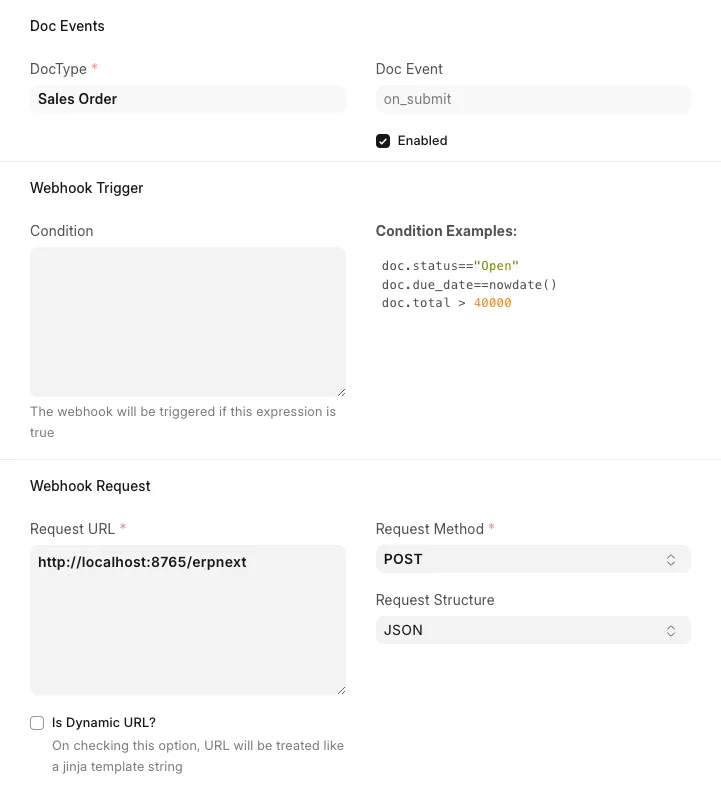
The Condition field is optional. Leave it empty to send every submitted order. The form shows examples, such as doc.total > 40000.
Step 3: Write the JSON body with Jinja#
Put this in JSON Request Body:
{
  "name": {{ doc.name | tojson }},
  "customer": {{ doc.customer | tojson }},
  "transaction_date": {{ doc.transaction_date | tojson }},
  "grand_total": {{ doc.grand_total }},
  "items": [
    {% for item in doc["items"] %}
    {"item_code": {{ item.item_code | tojson }}, "qty": {{ item.qty }}, "rate": {{ item.rate }}}{{ "," if not loop.last }}
    {% endfor %}
  ]
}
Use | tojson on text fields. It adds the quotes and escapes any quote inside the value, so the JSON stays valid.
Write doc["items"], not doc.items. Frappe turns the document into a dict before it renders the body. So doc.items is the dict's items method. Our first try with doc.items failed with this error:
TypeError: 'builtin_function_or_method' object is not iterable
The same applies to any field named like a dict method, such as items, values or keys.
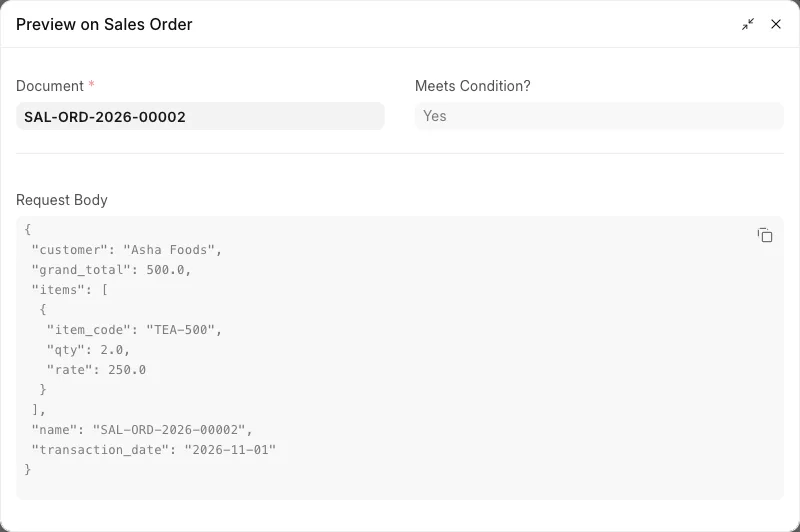
Click Preview at the top of the form and pick a Sales Order. The dialog shows the body that Frappe will send. Check it here before you submit real orders.
Step 4: Turn on the signature#
- Open the Webhook Security section.
- Tick Enable Security.
- Enter a long random Webhook Secret. Use the same value as
WEBHOOK_SECRETin the receiver. - Save.
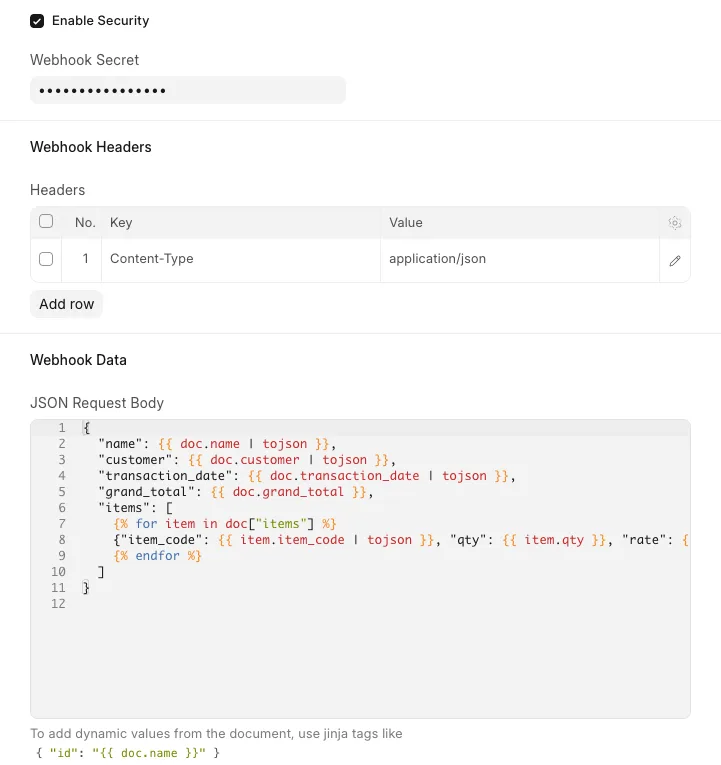
Frappe then adds the header X-Frappe-Webhook-Signature to each request. The value is the base64 of an HMAC-SHA256 of the request body, with your secret as the key. Compute the HMAC over the raw body bytes. Do not parse the JSON and dump it again, because the bytes can change.
You can add more headers in the Headers table, for example an API key that your receiver expects.
Step 5: Submit a Sales Order#
Submit any Sales Order. The webhook runs in a background job after the database commit. We submitted SAL-ORD-2026-00001 and the receiver printed:
got SAL-ORD-2026-00001 1000.0
127.0.0.1 - - [01/Nov/2026 10:17:12] "POST /erpnext HTTP/1.1" 200 -
The body arrived like this:
{
 "customer": "Asha Foods",
 "grand_total": 1000.0,
 "items": [
  {
   "item_code": "TEA-500",
   "qty": 4.0,
   "rate": 250.0
  }
 ],
 "name": "SAL-ORD-2026-00001",
 "transaction_date": "2026-11-01"
}
Frappe sorts the keys, so the order differs from your template.
Check the Webhook Request Log#
Open the Webhook Request Log list. Frappe adds one row for each attempt. Each row has the URL, the headers, the body, the response and the error.
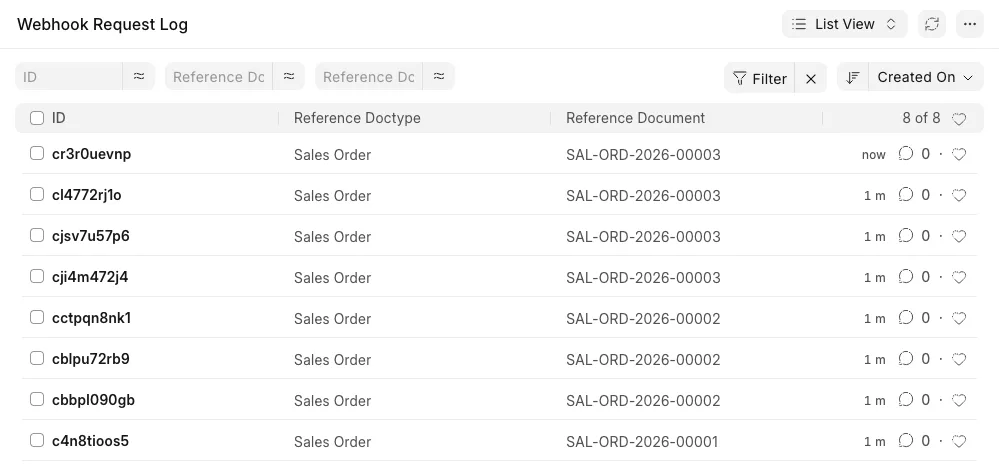
A good attempt has the receiver's reply in Response and an empty Error. Frappe deletes these rows after 30 days. You can change this in Log Settings.
Retries and errors#
Frappe tries each request 3 times. It waits 1 second before the second try and 4 seconds before the third. Any error status (4xx or 5xx) or a refused connection counts as a failure. After the third failure, Frappe stops. It does not try again later.
We tested two failures:
- We started the receiver with a different secret. It returned 401 three times. Each log row had
requests.exceptions.HTTPError: 401 Client Error: Unauthorized. - We stopped the receiver. Each log row had
Connection refused.
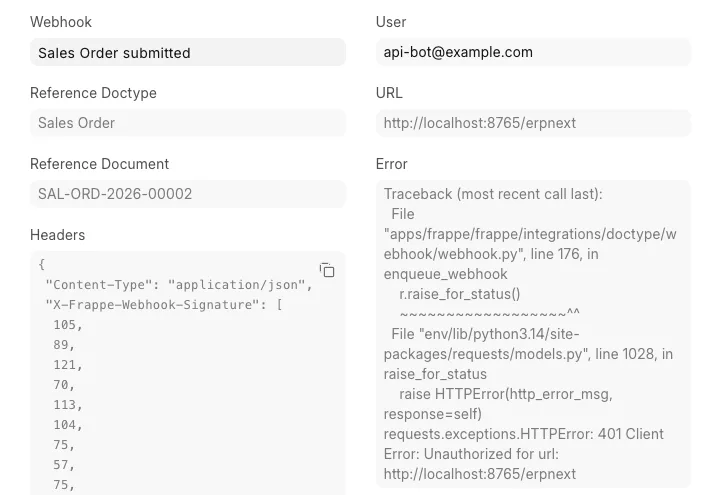
There is no Resend button. After you fix the receiver, resend one document from the bench console:
bench --site <site-name> console
webhook = frappe.get_doc("Webhook", "Sales Order submitted")
webhook.execute_for_doc(frappe.get_doc("Sales Order", "SAL-ORD-2026-00003"))
frappe.db.commit()
Replace the webhook name and the Sales Order name with yours. Our receiver got the order, and a new log row showed the 200 response.
If nothing arrives#
- No log row at all: check that the background worker runs. Webhooks run in the
defaultqueue unless you set another queue. - A log row with no Response and a Jinja error: Frappe could not build the body. It sent nothing. Fix the template and test it with Preview.
- Wrong event:
on_submitfires only on submit. Useafter_insertfor new drafts, oron_updatefor every save.
Sources#
- Webhooks (docs.frappe.io)
- Webhooks in ERPNext (discuss.frappe.io)
- Webhooks for Frappe (discuss.frappe.io)
- webhook.py (retry and signature code)