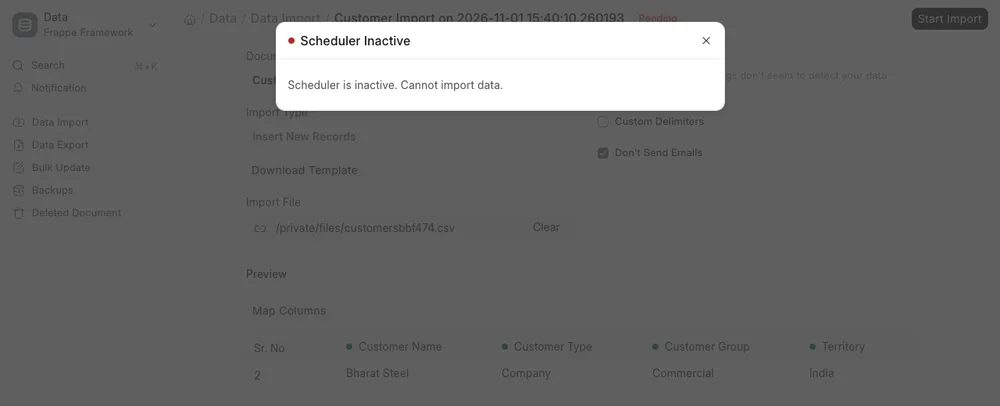
Scheduler is inactive. Cannot import data.
Applies to: Frappe v16.34.0, ERPNext v16.35.0, bench CLI 5.27.0. Self-hosted bench on Ubuntu 22.04. Checked 2026-11. Not checked on v15.
Run these commands in your bench folder. Then check the status:
bench --site <site-name> enable-scheduler
bench --site <site-name> scheduler resume
bench --site <site-name> scheduler status
Replace <site-name> with your site, for example erp.example.com. The last command must print Scheduler is enabled for site <site-name>. If it still says disabled, go to step 3 below.
Symptom#
Data Import shows this dialog when you click Start Import:
Scheduler Inactive
Scheduler is inactive. Cannot import data.
Other ERPNext tools show the same kind of message, for example Bank Statement Import and Ledger Merge. The RQ Job list shows a red "Scheduler: Inactive" indicator.
The second case has no message at all. The scheduler is enabled, but scheduled jobs do not run. Emails stay in the Email Queue as "Not Sent".
On a site with developer_mode on, Data Import runs the import at once. It does not show this error, even with the scheduler off. We saw this on our test site.
Cause#
Frappe treats the scheduler as inactive if any of these is true. The check is is_scheduler_inactive() in frappe/utils/scheduler.py.
- The site is in maintenance mode (
maintenance_modeis 1). pause_scheduleris set in the site config or incommon_site_config.json.disable_scheduleris set in the config.- The "Enable Scheduled Jobs" setting is off. On v16 this field is hidden in System Settings, so use bench.
A new site starts with the scheduler off. The setup wizard turns it on.
The setting is only one half. Jobs run only when two processes run. bench schedule puts due jobs in the Redis queues. bench worker runs them.
Fix#
Go to your bench folder and check the status.
bashcd ~/frappe-bench bench --site <site-name> scheduler status bench doctorbench doctortells you the reason. On our bench it printed:text-----Checking scheduler status----- Maintenance mode on for dev.localhost Scheduler paused for dev.localhost Scheduler inactive for dev.localhost Workers online: 1Enable the scheduler for the site.
bashbench --site <site-name> enable-schedulerIf
enable-schedulerprints "Enabled" but the status is still "disabled", look for leftover keys.bashgrep -n "maintenance_mode\|pause_scheduler" sites/common_site_config.json sites/<site-name>/site_config.jsonWe hit this.
enable-schedulerprintedEnabled for dev.localhost, andscheduler statusstill printedScheduler is disabled. Both keys were set to 1 incommon_site_config.json.bench updatewrites these two keys at the start. It sets them back to 0 at the end. If the update fails or you stop it, the keys stay at 1. Every site on the bench is then affected. We copied this state by setting the keys by hand.Set both keys back to 0 for the whole bench:
bashbench set-config -g maintenance_mode 0 bench set-config -g pause_scheduler 0To fix one site only, run these commands. A key in the site's
site_config.jsonwins overcommon_site_config.json.bashbench --site <site-name> set-maintenance-mode off bench --site <site-name> scheduler resumeCheck that the scheduler and worker processes run. A status of "enabled" only means the setting is on.
Open System Health Report from the awesome bar. With both processes stopped, our report showed 0 workers and "Process Not Found":
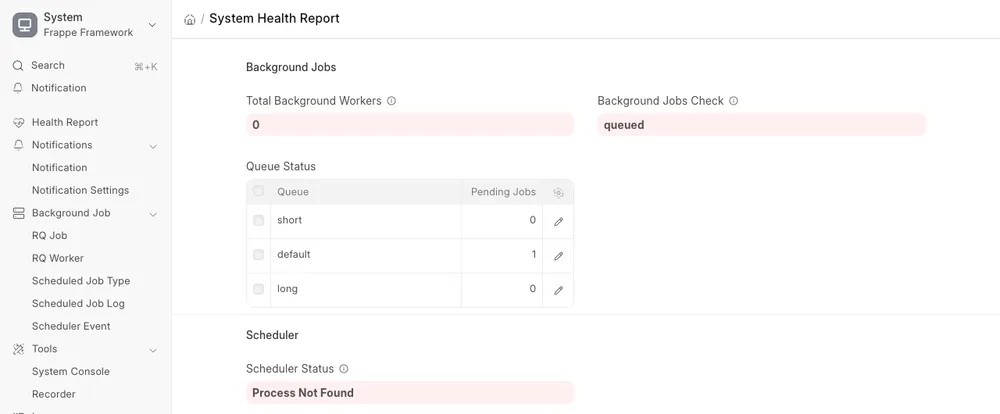
bench doctorprintedWorkers online: 0. The RQ Job indicator reads only the setting, so it does not show this case.On a development bench,
bench startruns the processes from theProcfile. Check that it has aschedule:line and aworker:line. We removed these two lines to copy the problem.On a production bench, supervisor runs them. Check with:
bashsudo supervisorctl statusStart any stopped worker or schedule program. The program names include your bench name, for example
frappe-bench-workers:. We did not test the supervisor commands for this guide.Check that a worker listens to the
longqueue.On v16, jobs with the frequency "Hourly Maintenance", "Daily Maintenance", "Weekly Long" or "Monthly Long" go to the
longqueue. On our site, 58 of 82 Scheduled Job Types use it.We started the worker with
bench worker --queue short,defaultonly. Emails went out, but the Auto Repeat job stayed in the queue:
bench doctorshowedQueue: longwithNumber of Jobs: 1. After we started a worker for all queues, the job ran within a minute. A production bench often has a separate long worker. If that one is stopped, only the long jobs stop.
Check that it worked#
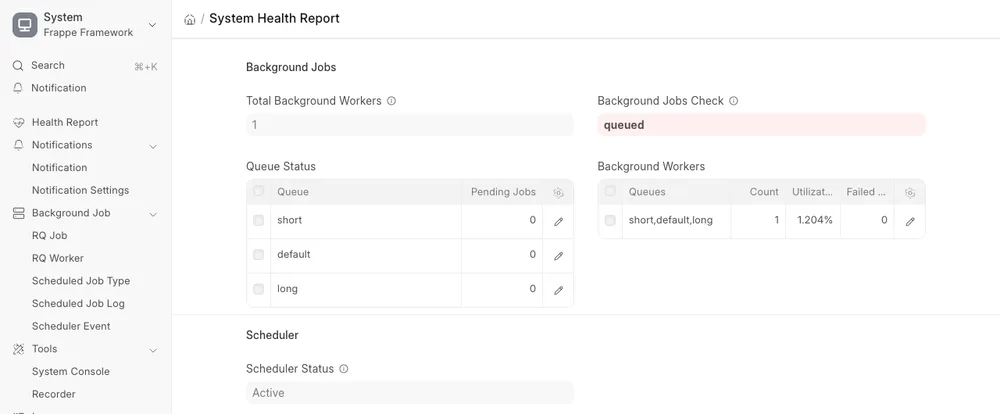
bench --site <site-name> scheduler statusprintsScheduler is enabled for site <site-name>.- System Health Report shows Scheduler Status "Active" and at least 1 worker.
- Open the Scheduled Job Type
frappe.email.queue.flush. Its Last Execution is less than 4 minutes old. This job runs every 4 minutes by default. - The Scheduled Job Log list gets new rows with the status "Complete". Jobs with the frequency "All" or "Cron" do not write a log, unless you tick "Create Log".
If it still fails#
- A job that runs but fails shows the status "Failed" in Scheduled Job Log. Open the row to read the traceback.
- A scheduled Server Script also needs Server Scripts enabled. See Server Scripts are disabled.
- On Frappe Cloud you cannot run bench commands. We did not test this case.
- Look in
~/frappe-bench/logs/worker.error.logfor the newest error. Post it on discuss.frappe.io with your versions (bench version).
Sources#
- Auto-enable scheduler (discuss.frappe.io)
- Why scheduler is not running (discuss.frappe.io)
- isschedulerinactive in frappe/utils/scheduler.py, version-16
- bench update sets maintenancemode and pausescheduler (bench/utils/bench.py)