Upgrade ERPNext from v15 to v16
Applies to: Frappe 15.125.0 and ERPNext 15.124.3, upgraded to Frappe 16.54.0 and ERPNext 16.53.0. Ubuntu 22.04, MariaDB 10.6.23, bench CLI 5.27.0. Checked 2026-11. We tested on a development bench (bench start), not a production bench with supervisor.
v16 needs Python 3.14 and Node 24. Your v15 bench uses an older Python. So bench switch-to-branch alone fails. Switch the branches, then build a new Python 3.14 environment with bench migrate-env, then migrate.
Symptom#
You run the upgrade command:
bench switch-to-branch version-16 frappe erpnext --upgrade
It fails while it installs frappe:
  File "<unknown>", line 93
    type ConfType = _dict[str, Any]  # type: ignore[no-any-explicit]
         ^^^^^^^^
SyntaxError: invalid syntax
ERROR: Failed to build 'file:///home/frappe/bench15/apps/frappe' when getting requirements to build editable
The site also stops working. The apps are already on the version-16 code, but the bench still runs Python 3.10. Our web process crashed with the same SyntaxError.
Cause#
v16 code uses Python 3.14 syntax. The type X = ... line is not valid on Python 3.10 to 3.13. The bench environment in env/ keeps the Python it was made with. switch-to-branch changes the git branch, but it does not change that Python.
Fix#
- Take a backup with files. Keep a copy off the server.
bash
bench --site <site-name> backup --with-files - Switch both apps to version-16. Expect the
SyntaxErrorabove. The git branches change anyway.bashbench switch-to-branch version-16 frappe erpnext --upgrade - Install Python 3.14. Ubuntu 22.04 does not ship it, so we used uv.
bash
curl -LsSf https://astral.sh/uv/install.sh | sh uv python install 3.14 - Make a new bench environment with Python 3.14. This also installs the v16 Python packages.
bash
bench migrate-env $(uv python find 3.14) - Install Node 24 and yarn. We use nvm.
bash
nvm install 24 nvm alias default 24 npm install -g yarn - Make the Procfile use the new Node path. Our Procfile still pointed at Node 20.
bash
bench setup procfile - Start the bench services again.
bench migrateneeds Redis, and it stops with this message if Redis is down:On a development bench, runtextService redis_cache is not running. Cannot run bench migrate without the services running.bench start. On a production bench, restart supervisor. - Migrate the site.
bash
bench --site <site-name> migrate - Install the v16 Node packages, then build the assets.
On another bench we ranbash
bench setup requirements bench buildbench buildafter an update but before this step. It failed withCould not resolve "@atlaskit/pragmatic-drag-and-drop/element/adapter". - Clear the cache.
bash
bench --site <site-name> clear-cache
Check that it worked#
bench version
We got this output:
erpnext 16.53.0 version-16 (9cd11b1)
frappe 16.54.0 version-16 (2fcb939)
Then log in. Our three v15 Sales Invoices, one Purchase Invoice and 8 GL Entries were all there. The Accounts Receivable report showed all three amounts as outstanding.
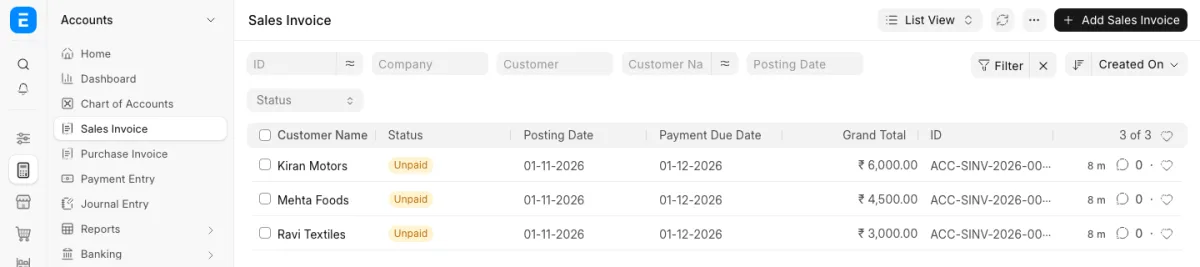
The desk looks different in v16. Each module now has its own sidebar. To change it, see How to edit the sidebar and workspace menu in ERPNext v16.
If it still fails#
Package 'frappe' requires a different Python: 3.14.2 not in '<3.14,>=3.10': pip read the v15 package. Check thatapps/frappeis on version-16 withgit -C apps/frappe branch --show-current, then run step 4 again. One forum user fixed it this way.- On a production bench, supervisor runs the web, worker and socketio processes. Its config can hold the old Python or Node path. Run
bench setup supervisorand restart supervisor. We did not test this on a production bench. - The Frappe install docs list MariaDB 11.8 for v16. Our upgrade and migrate worked on MariaDB 10.6.23. We do not know which v16 features need 11.8.
- Custom apps must have a version-16 branch, or they can stop the migrate. We tested only frappe and erpnext.
Sources#
- Guide to upgrading bench Frappe and ERPNext from v15 to v16 on Debian 12: https://discuss.frappe.io/t/guide-to-upgrading-bench-frappe-and-erpnext-from-v15-to-v16-on-debian-12/159062
- Frappe installation docs (version table): https://docs.frappe.io/framework/user/en/installation